Variable: AdwAlertDialog
constAdwAlertDialog:"AdwAlertDialog"
Defined in: generated/jsx.ts:13360
A dialog presenting a message or a question.
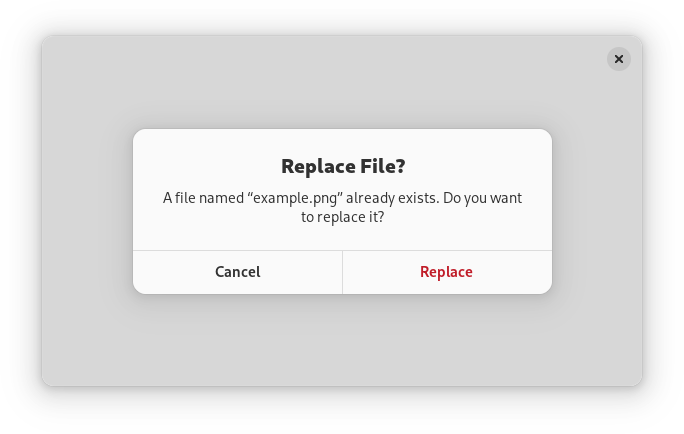
Alert dialogs have a heading, a body, an optional child widget, and one or multiple responses, each presented as a button.
Each response has a unique string ID, and a button label. Additionally, each response can be enabled or disabled, and can have a suggested or destructive appearance.
When one of the responses is activated, or the dialog is closed, the
AlertDialog.:response signal will be emitted. This signal is
detailed, and the detail, as well as the response parameter will be set to
the ID of the activated response, or to the value of the
AlertDialog.close-response property if the dialog had been closed
without activating any of the responses.
Response buttons can be presented horizontally or vertically depending on available space.
When a response is activated, AdwAlertDialog is closed automatically.
An example of using an alert dialog:
AdwDialog *dialog;

dialog = adw_alert_dialog_new (_("Replace File?"), NULL);

adw_alert_dialog_format_body (ADW_ALERT_DIALOG (dialog),
                              _("A file named “%s” already exists. Do you want to replace it?"),
                              filename);

adw_alert_dialog_add_responses (ADW_ALERT_DIALOG (dialog),
                                "cancel",  _("_Cancel"),
                                "replace", _("_Replace"),
                                NULL);

adw_alert_dialog_set_response_appearance (ADW_ALERT_DIALOG (dialog),
                                          "replace",
                                          ADW_RESPONSE_DESTRUCTIVE);

adw_alert_dialog_set_default_response (ADW_ALERT_DIALOG (dialog), "cancel");
adw_alert_dialog_set_close_response (ADW_ALERT_DIALOG (dialog), "cancel");

g_signal_connect (dialog, "response", G_CALLBACK (response_cb), self);

adw_dialog_present (dialog, parent);
Async API
AdwAlertDialog can also be used via the AlertDialog.choose method.
This API follows the GIO async pattern, for example:
static void
dialog_cb (AdwAlertDialog *dialog,
           GAsyncResult   *result,
           MyWindow       *self)
{
  const char *response = adw_alert_dialog_choose_finish (dialog, result);

  // ...
}

static void
show_dialog (MyWindow *self)
{
  AdwDialog *dialog;

  dialog = adw_alert_dialog_new (_("Replace File?"), NULL);

  adw_alert_dialog_format_body (ADW_ALERT_DIALOG (dialog),
                                _("A file named “%s” already exists. Do you want to replace it?"),
                                filename);

  adw_alert_dialog_add_responses (ADW_ALERT_DIALOG (dialog),
                                  "cancel",  _("_Cancel"),
                                  "replace", _("_Replace"),
                                  NULL);

  adw_alert_dialog_set_response_appearance (ADW_ALERT_DIALOG (dialog),
                                            "replace",
                                            ADW_RESPONSE_DESTRUCTIVE);

  adw_alert_dialog_set_default_response (ADW_ALERT_DIALOG (dialog), "cancel");
  adw_alert_dialog_set_close_response (ADW_ALERT_DIALOG (dialog), "cancel");

  adw_alert_dialog_choose (ADW_ALERT_DIALOG (dialog), GTK_WIDGET (self),
                           NULL, (GAsyncReadyCallback) dialog_cb, self);
}
AdwAlertDialog as GtkBuildable
AdwAlertDialog supports adding responses in UI definitions by via the
<responses> element that may contain multiple <response> elements, each
representing a response.
Each of the <response> elements must have the id attribute specifying the
response ID. The contents of the element are used as the response label.
Response labels can be translated with the usual translatable, context
and comments attributes.
The <response> elements can also have enabled and/or appearance
attributes. See AlertDialog.set_response_enabled and
AlertDialog.set_response_appearance for details.
Example of an AdwAlertDialog UI definition:
<object class="AdwAlertDialog" id="dialog">
  <property name="heading" translatable="yes">Save Changes?</property>
  <property name="body" translatable="yes">Open documents contain unsaved changes. Changes which are not saved will be permanently lost.</property>
  <property name="default-response">save</property>
  <property name="close-response">cancel</property>
  <signal name="response" handler="response_cb"/>
  <responses>
    <response id="cancel" translatable="yes">_Cancel</response>
    <response id="discard" translatable="yes" appearance="destructive">_Discard</response>
    <response id="save" translatable="yes" appearance="suggested" enabled="false">_Save</response>
  </responses>
</object>