Variable: GtkFrame
constGtkFrame:"GtkFrame"
Defined in: generated/jsx.ts:15784
Surrounds its child with a decorative frame and an optional label.
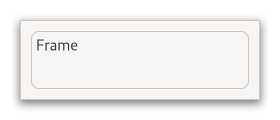
If present, the label is drawn inside the top edge of the frame. The horizontal position of the label can be controlled with Gtk.Frame.set_label_align.
GtkFrame clips its child. You can use this to add rounded corners
to widgets, but be aware that it also cuts off shadows.
GtkFrame as GtkBuildable
An example of a UI definition fragment with GtkFrame:
<object class="GtkFrame">
  <property name="label-widget">
    <object class="GtkLabel" id="frame_label"/>
  </property>
  <property name="child">
    <object class="GtkEntry" id="frame_content"/>
  </property>
</object>
CSS nodes
frame
├── <label widget>
╰── <child>
GtkFrame has a main CSS node with name “frame”, which is used to draw the
visible border. You can set the appearance of the border using CSS properties
like “border-style” on this node.
Accessibility
GtkFrame uses the Gtk.AccessibleRole.group role.