Variable: GtkSearchBar
constGtkSearchBar:"GtkSearchBar"
Defined in: generated/jsx.ts:19131
Reveals a search entry when search is started.
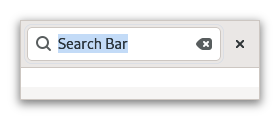
It can also contain additional widgets, such as drop-down menus, or buttons. The search bar would appear when a search is started through typing on the keyboard, or the application’s search mode is toggled on.
For keyboard presses to start a search, the search bar must be told of a widget to capture key events from through Gtk.SearchBar.set_key_capture_widget. This widget will typically be the top-level window, or a parent container of the search bar. Common shortcuts such as Ctrl+F should be handled as an application action, or through the menu items.
You will also need to tell the search bar about which entry you are using as your search entry using Gtk.SearchBar.connect_entry.
Creating a search bar
The following example shows you how to create a more complex search entry.
Shortcuts and Gestures
GtkSearchBar supports the following keyboard shortcuts:
Escapehides the search bar.
CSS nodes
searchbar
╰── revealer
    ╰── box
         ├── [child]
         ╰── [button.close]
GtkSearchBar has a main CSS node with name searchbar. It has a child
node with name revealer that contains a node with name box. The box node
contains both the CSS node of the child widget as well as an optional button
node which gets the .close style class applied.
Accessibility
GtkSearchBar uses the Gtk.AccessibleRole.search role.