Variable: GtkBox
constGtkBox:"GtkBox"
Defined in: generated/jsx.ts:13768
Arranges child widgets into a single row or column.
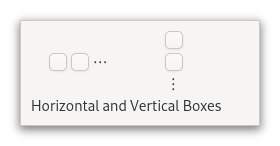
Whether it is a row or column depends on the value of its Gtk.Orientable.orientation property. Within the other dimension, all children are allocated the same size. The Gtk.Widget.halign and Gtk.Widget.valign properties can be used on the children to influence their allocation.
Use repeated calls to Gtk.Box.append to pack widgets into a
GtkBox from start to end. Use Gtk.Box.remove to remove widgets
from the GtkBox. Gtk.Box.insert_child_after can be used to add
a child at a particular position.
Use Gtk.Box.set_homogeneous to specify whether or not all children
of the GtkBox are forced to get the same amount of space.
Use Gtk.Box.set_spacing to determine how much space will be minimally
placed between all children in the GtkBox. Note that spacing is added
between the children.
Use Gtk.Box.reorder_child_after to move a child to a different place in the box.
CSS nodes
GtkBox uses a single CSS node with name box.
Accessibility
Until GTK 4.10, GtkBox used the Gtk.AccessibleRole.group role.
Starting from GTK 4.12, GtkBox uses the Gtk.AccessibleRole.generic role.