Variable: GtkListBox
constGtkListBox:"GtkListBox"
Defined in: generated/jsx.ts:17022
Shows a vertical list.
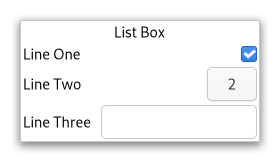
A GtkListBox only contains GtkListBoxRow children. These rows can
by dynamically sorted and filtered, and headers can be added dynamically
depending on the row content. It also allows keyboard and mouse navigation
and selection like a typical list.
Using GtkListBox is often an alternative to GtkTreeView, especially
when the list contents has a more complicated layout than what is allowed
by a GtkCellRenderer, or when the contents is interactive (i.e. has a
button in it).
Although a GtkListBox must have only GtkListBoxRow children, you can
add any kind of widget to it via Gtk.ListBox.prepend,
Gtk.ListBox.append and Gtk.ListBox.insert and a
GtkListBoxRow widget will automatically be inserted between the list
and the widget.
GtkListBoxRows can be marked as activatable or selectable. If a row is
activatable, Gtk.ListBox.:row-activated will be emitted for it when
the user tries to activate it. If it is selectable, the row will be marked
as selected when the user tries to select it.
GtkListBox as GtkBuildable
The GtkListBox implementation of the GtkBuildable interface supports
setting a child as the placeholder by specifying “placeholder” as the “type”
attribute of a <child> element. See Gtk.ListBox.set_placeholder
for info.
Shortcuts and Gestures
The following signals have default keybindings:
- Gtk.ListBox.:move-cursor
- Gtk.ListBox.:select-all
- Gtk.ListBox.:toggle-cursor-row
- Gtk.ListBox.:unselect-all
CSS nodes
list[.separators][.rich-list][.navigation-sidebar][.boxed-list]
╰── row[.activatable]
GtkListBox uses a single CSS node named list. It may carry the .separators
style class, when the Gtk.ListBox.show-separators property is set.
Each GtkListBoxRow uses a single CSS node named row. The row nodes get the
.activatable style class added when appropriate.
It may also carry the .boxed-list style class. In this case, the list will be automatically surrounded by a frame and have separators.
The main list node may also carry style classes to select the style of list presentation: .rich-list, .navigation-sidebar or .data-table.
Accessibility
GtkListBox uses the Gtk.AccessibleRole.list role and GtkListBoxRow uses
the Gtk.AccessibleRole.list_item role.