Variable: AdwTabOverview
constAdwTabOverview:"AdwTabOverview"
Defined in: generated/jsx.ts:20129
A tab overview for TabView.
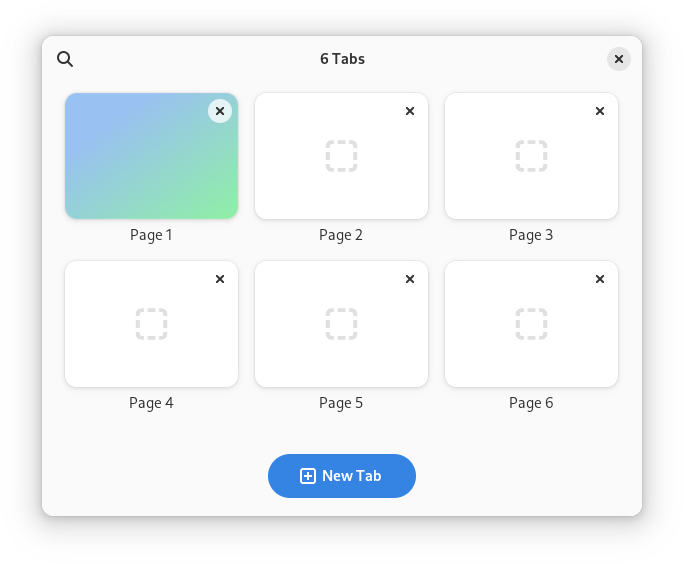
AdwTabOverview is a widget that can display tabs from an AdwTabView in a
grid.
AdwTabOverview shows a thumbnail for each tab. By default thumbnails are
static for all pages except the selected one. They can be made always live
by setting TabPage.live-thumbnail to TRUE, or refreshed with
TabPage.invalidate_thumbnail or
TabView.invalidate_thumbnails otherwise.
If the pages are too tall or too wide, the thumbnails will be cropped; use TabPage.thumbnail-xalign and TabPage.thumbnail-yalign to control which part of the page should be visible in this case.
Pinned tabs are shown as smaller cards without thumbnails above the other tabs. Unlike in TabBar, they still have titles, as well as an unpin button.
AdwTabOverview provides search in open tabs. It searches in tab titles and
tooltips, as well as TabPage.keyword.
If TabOverview.enable-new-tab is set to TRUE, a new tab button
will be shown. Connect to the TabOverview.:create-tab signal to use
it.
TabOverview.secondary-menu can be used to provide a secondary menu for the overview. Use it to add extra actions, e.g. to open a new window or undo closed tab.
AdwTabOverview is intended to be used as the direct child of the window,
with the rest of the window contents set as the TabOverview.child.
The child is expected to contain an TabView.
AdwTabOverview shows window buttons by default. They can be disabled by
setting TabOverview.show-start-title-buttons and/or
TabOverview.show-start-title-buttons and/or
TabOverview.show-end-title-buttons to FALSE.
If search and window buttons are disabled, and secondary menu is not set, the header bar will be hidden.
Actions
AdwTabOverview defines the overview.open and overview.close actions for
opening and closing itself. They can be convenient when used together with
TabButton.
CSS nodes
AdwTabOverview has a single CSS node with name taboverview.