Variable: GtkMessageDialog
constGtkMessageDialog:"GtkMessageDialog"
Defined in: generated/jsx.ts:17463
GtkMessageDialog presents a dialog with some message text.
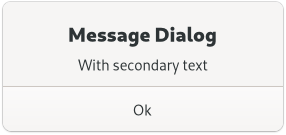
It’s simply a convenience widget; you could construct the equivalent of
GtkMessageDialog from GtkDialog without too much effort, but
GtkMessageDialog saves typing.
The easiest way to do a modal message dialog is to use the %GTK_DIALOG_MODAL flag, which will call Gtk.Window.set_modal internally. The dialog will prevent interaction with the parent window until it's hidden or destroyed. You can use the Gtk.Dialog.:response signal to know when the user dismissed the dialog.
An example for using a modal dialog:
GtkDialogFlags flags = GTK_DIALOG_DESTROY_WITH_PARENT | GTK_DIALOG_MODAL;
dialog = gtk_message_dialog_new (parent_window,
                                 flags,
                                 GTK_MESSAGE_ERROR,
                                 GTK_BUTTONS_CLOSE,
                                 "Error reading “%s”: %s",
                                 filename,
                                 g_strerror (errno));
// Destroy the dialog when the user responds to it
// (e.g. clicks a button)

g_signal_connect (dialog, "response",
                  G_CALLBACK (gtk_window_destroy),
                  NULL);
You might do a non-modal GtkMessageDialog simply by omitting the
%GTK_DIALOG_MODAL flag:
GtkDialogFlags flags = GTK_DIALOG_DESTROY_WITH_PARENT;
dialog = gtk_message_dialog_new (parent_window,
                                 flags,
                                 GTK_MESSAGE_ERROR,
                                 GTK_BUTTONS_CLOSE,
                                 "Error reading “%s”: %s",
                                 filename,
                                 g_strerror (errno));

// Destroy the dialog when the user responds to it
// (e.g. clicks a button)
g_signal_connect (dialog, "response",
                  G_CALLBACK (gtk_window_destroy),
                  NULL);
GtkMessageDialog as GtkBuildable
The GtkMessageDialog implementation of the GtkBuildable interface exposes
the message area as an internal child with the name “message_area”.