Variable: AdwOverlaySplitView
constAdwOverlaySplitView:"AdwOverlaySplitView"
Defined in: generated/jsx.ts:18141
A widget presenting sidebar and content side by side or as an overlay.
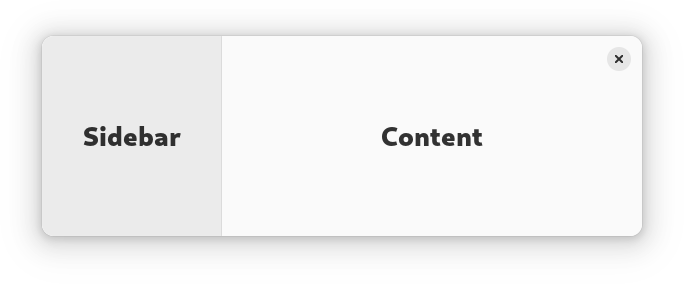
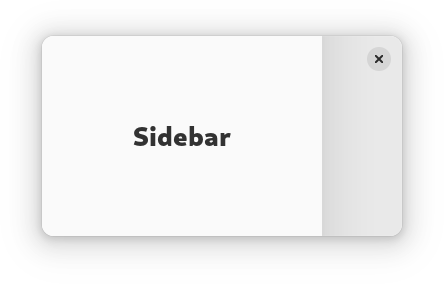
AdwOverlaySplitView has two children: sidebar and content, and displays
them side by side.
When OverlaySplitView.collapsed is set to TRUE, the sidebar is
instead shown as an overlay above the content widget.
The sidebar can be hidden or shown using the OverlaySplitView.show-sidebar property.
Sidebar can be displayed before or after the content, this can be controlled with the OverlaySplitView.sidebar-position property.
Collapsing the split view automatically hides the sidebar widget, and uncollapsing it shows the sidebar. If this behavior is not desired, the OverlaySplitView.pin-sidebar property can be used to override it.
AdwOverlaySplitView supports an edge swipe gesture for showing the sidebar,
and a swipe from the sidebar for hiding it. Gestures are only supported on
touchscreen, but not touchpad. Gestures can be controlled with the
OverlaySplitView.enable-show-gesture and
OverlaySplitView.enable-hide-gesture properties.
See also NavigationSplitView.
AdwOverlaySplitView is typically used together with an Breakpoint
setting the collapsed property to TRUE on small widths, as follows:
<object class="AdwWindow">
  <property name="default-width">800</property>
  <property name="default-height">800</property>
  <child>
    <object class="AdwBreakpoint">
      <condition>max-width: 400sp</condition>
      <setter object="split_view" property="collapsed">True</setter>
    </object>
  </child>
  <property name="content">
    <object class="AdwOverlaySplitView" id="split_view">
      <property name="sidebar">
        <!-- ... -->
      </property>
      <property name="content">
        <!-- ... -->
      </property>
    </object>
  </property>
</object>
AdwOverlaySplitView is often used for implementing the
utility pane
pattern.
Sizing
When not collapsed, AdwOverlaySplitView changes the sidebar width
depending on its own width.
If possible, it tries to allocate a fraction of the total width, controlled with the OverlaySplitView.sidebar-width-fraction property.
The sidebar also has minimum and maximum sizes, controlled with the OverlaySplitView.min-sidebar-width and OverlaySplitView.max-sidebar-width properties.
The minimum and maximum sizes are using the length unit specified with the OverlaySplitView.sidebar-width-unit.
By default, sidebar is using 25% of the total width, with 180sp as the minimum size and 280sp as the maximum size.
When collapsed, the preferred width fraction is ignored and the sidebar uses OverlaySplitView.max-sidebar-width when possible.
Header Bar Integration
When used inside AdwOverlaySplitView, HeaderBar will automatically
hide the window buttons in the middle.
AdwOverlaySplitView as GtkBuildable
The AdwOverlaySplitView implementation of the Gtk.Buildable
interface supports setting the sidebar widget by specifying “sidebar” as the
“type” attribute of a <child> element, Specifying “content” child type or
omitting it results in setting the content widget.
CSS nodes
AdwOverlaySplitView has a single CSS node with the name
overlay-split-view.
It contains two nodes with the name widget, containing the sidebar and
content children.
When not collapsed, they have the .sidebar-view and .content-view style
classes respectively.
overlay-split-view
├── widget.sidebar-pane
│   ╰── [sidebar child]
╰── widget.content-pane
    ╰── [content child]
When collapsed, the one containing the sidebar child has the .background
style class and the other one has no style classes.
overlay-split-view
├── widget.background
│   ╰── [sidebar child]
╰── widget
    ╰── [content child]
Accessibility
AdwOverlaySplitView uses the GTK_ACCESSIBLE_ROLE_GROUP role.