Variable: GtkFileChooserDialog
constGtkFileChooserDialog:"GtkFileChooserDialog"
Defined in: generated/jsx.ts:15465
GtkFileChooserDialog is a dialog suitable for use with
“File Open” or “File Save” commands.
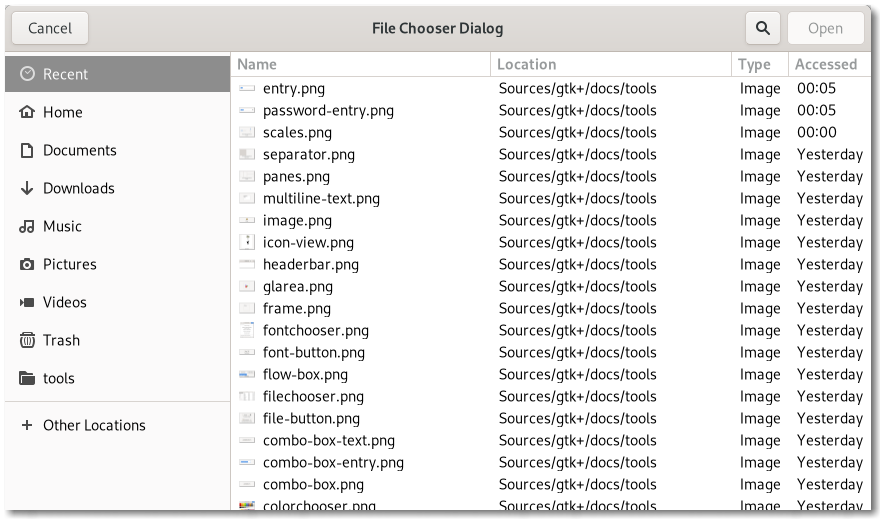
This widget works by putting a Gtk.FileChooserWidget inside a Gtk.Dialog. It exposes the Gtk.FileChooser interface, so you can use all of the Gtk.FileChooser functions on the file chooser dialog as well as those for Gtk.Dialog.
Note that GtkFileChooserDialog does not have any methods of its
own. Instead, you should use the functions that work on a
Gtk.FileChooser.
If you want to integrate well with the platform you should use the
Gtk.FileChooserNative API, which will use a platform-specific
dialog if available and fall back to GtkFileChooserDialog
otherwise.
Typical usage
In the simplest of cases, you can the following code to use
GtkFileChooserDialog to select a file for opening:
static void
on_open_response (GtkDialog *dialog,
                  int        response)
{
  if (response == GTK_RESPONSE_ACCEPT)
    {
      GtkFileChooser *chooser = GTK_FILE_CHOOSER (dialog);

      g_autoptr(GFile) file = gtk_file_chooser_get_file (chooser);

      open_file (file);
    }

  gtk_window_destroy (GTK_WINDOW (dialog));
}

  // ...
  GtkWidget *dialog;
  GtkFileChooserAction action = GTK_FILE_CHOOSER_ACTION_OPEN;

  dialog = gtk_file_chooser_dialog_new ("Open File",
                                        parent_window,
                                        action,
                                        _("_Cancel"),
                                        GTK_RESPONSE_CANCEL,
                                        _("_Open"),
                                        GTK_RESPONSE_ACCEPT,
                                        NULL);

  gtk_window_present (GTK_WINDOW (dialog));

  g_signal_connect (dialog, "response",
                    G_CALLBACK (on_open_response),
                    NULL);
To use a dialog for saving, you can use this:
static void
on_save_response (GtkDialog *dialog,
                  int        response)
{
  if (response == GTK_RESPONSE_ACCEPT)
    {
      GtkFileChooser *chooser = GTK_FILE_CHOOSER (dialog);

      g_autoptr(GFile) file = gtk_file_chooser_get_file (chooser);

      save_to_file (file);
    }

  gtk_window_destroy (GTK_WINDOW (dialog));
}

  // ...
  GtkWidget *dialog;
  GtkFileChooser *chooser;
  GtkFileChooserAction action = GTK_FILE_CHOOSER_ACTION_SAVE;

  dialog = gtk_file_chooser_dialog_new ("Save File",
                                        parent_window,
                                        action,
                                        _("_Cancel"),
                                        GTK_RESPONSE_CANCEL,
                                        _("_Save"),
                                        GTK_RESPONSE_ACCEPT,
                                        NULL);
  chooser = GTK_FILE_CHOOSER (dialog);

  if (user_edited_a_new_document)
    gtk_file_chooser_set_current_name (chooser, _("Untitled document"));
  else
    gtk_file_chooser_set_file (chooser, existing_filename);

  gtk_window_present (GTK_WINDOW (dialog));

  g_signal_connect (dialog, "response",
                    G_CALLBACK (on_save_response),
                    NULL);
Setting up a file chooser dialog
There are various cases in which you may need to use a GtkFileChooserDialog:
-
To select a file for opening, use %GTK_FILE_CHOOSER_ACTION_OPEN.
-
To save a file for the first time, use %GTK_FILE_CHOOSER_ACTION_SAVE, and suggest a name such as “Untitled” with Gtk.FileChooser.set_current_name.
-
To save a file under a different name, use %GTK_FILE_CHOOSER_ACTION_SAVE, and set the existing file with Gtk.FileChooser.set_file.
-
To choose a folder instead of a file, use %GTK_FILE_CHOOSER_ACTION_SELECT_FOLDER.
In general, you should only cause the file chooser to show a specific folder when it is appropriate to use Gtk.FileChooser.set_file, i.e. when you are doing a “Save As” command and you already have a file saved somewhere.
Response Codes
GtkFileChooserDialog inherits from Gtk.Dialog, so buttons that
go in its action area have response codes such as %GTK_RESPONSE_ACCEPT and
%GTK_RESPONSE_CANCEL. For example, you could call
Gtk.FileChooserDialog.new as follows:
GtkWidget *dialog;
GtkFileChooserAction action = GTK_FILE_CHOOSER_ACTION_OPEN;

dialog = gtk_file_chooser_dialog_new ("Open File",
                                      parent_window,
                                      action,
                                      _("_Cancel"),
                                      GTK_RESPONSE_CANCEL,
                                      _("_Open"),
                                      GTK_RESPONSE_ACCEPT,
                                      NULL);
This will create buttons for “Cancel” and “Open” that use predefined
response identifiers from Gtk.ResponseType. For most dialog
boxes you can use your own custom response codes rather than the
ones in Gtk.ResponseType, but GtkFileChooserDialog assumes that
its “accept”-type action, e.g. an “Open” or “Save” button,
will have one of the following response codes:
- %GTK_RESPONSE_ACCEPT
- %GTK_RESPONSE_OK
- %GTK_RESPONSE_YES
- %GTK_RESPONSE_APPLY
This is because GtkFileChooserDialog must intercept responses and switch
to folders if appropriate, rather than letting the dialog terminate — the
implementation uses these known response codes to know which responses can
be blocked if appropriate.
To summarize, make sure you use a predefined response code
when you use GtkFileChooserDialog to ensure proper operation.
CSS nodes
GtkFileChooserDialog has a single CSS node with the name window and style
class .filechooser.