Variable: GtkToggleButton
constGtkToggleButton:"GtkToggleButton"
Defined in: generated/jsx.ts:20481
Shows a button which remains “pressed-in” when clicked.
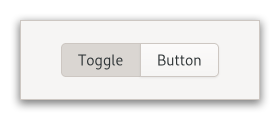
Clicking again will cause the toggle button to return to its normal state.
A toggle button is created by calling either Gtk.ToggleButton.new or
Gtk.ToggleButton.new_with_label. If using the former, it is advisable
to pack a widget, (such as a GtkLabel and/or a GtkImage), into the toggle
button’s container. (See Gtk.Button for more information).
The state of a GtkToggleButton can be set specifically using
Gtk.ToggleButton.set_active, and retrieved using
Gtk.ToggleButton.get_active.
Grouping
Toggle buttons can be grouped together, to form mutually exclusive groups - only one of the buttons can be toggled at a time, and toggling another one will switch the currently toggled one off.
To add a GtkToggleButton to a group, use Gtk.ToggleButton.set_group.
CSS nodes
GtkToggleButton has a single CSS node with name button. To differentiate
it from a plain GtkButton, it gets the .toggle style class.
Accessibility
GtkToggleButton uses the Gtk.AccessibleRole.toggle_button role.
Creating two GtkToggleButton widgets.
static void
output_state (GtkToggleButton *source,
              gpointer         user_data)
{
  g_print ("Toggle button "%s" is active: %s",
           gtk_button_get_label (GTK_BUTTON (source)),
           gtk_toggle_button_get_active (source) ? "Yes" : "No");
}

static void
make_toggles (void)
{
  GtkWidget *window, *toggle1, *toggle2;
  GtkWidget *box;
  const char *text;

  window = gtk_window_new ();
  box = gtk_box_new (GTK_ORIENTATION_VERTICAL, 12);

  text = "Hi, I’m toggle button one";
  toggle1 = gtk_toggle_button_new_with_label (text);

  g_signal_connect (toggle1, "toggled",
                    G_CALLBACK (output_state),
                    NULL);
  gtk_box_append (GTK_BOX (box), toggle1);

  text = "Hi, I’m toggle button two";
  toggle2 = gtk_toggle_button_new_with_label (text);
  g_signal_connect (toggle2, "toggled",
                    G_CALLBACK (output_state),
                    NULL);
  gtk_box_append (GTK_BOX (box), toggle2);

  gtk_window_set_child (GTK_WINDOW (window), box);
  gtk_window_present (GTK_WINDOW (window));
}